
If you have ever wanted to save a TikTok video for offline viewing, you may have come across SSSTIK, a third party TikTok video downloader that is commonly used to process TikTok links and save available videos in downloadable formats.
SSSTIKTOK is mainly associated with TikTok video downloads without the visible TikTok watermark, with some SSSTIK branded services also offering MP4 and MP3 options. The exact features can vary between SSSTIK-branded websites, so it is important not to assume that every site using the SSSTIK name is the same service.
In this guide, we explain what SSSTIK is, how it works, how to use it, what happens when a download fails, whether it is safe, what “without watermark” really means, and what you should know before reusing someone else’s TikTok content.
Quick answer: ssstik downloader is a third party TikTok downloading service. The usual process is simple: copy a public TikTok video’s link, paste it into the downloader, process the link, and select an available download option. However, the result can depend on the video, URL and particular SSSTIK service being used.
What Is SSSTIK?
SSSTIK is a name used by TikTok video downloading services that let users process TikTok video links and save available media to their devices.
The most common search intent behind terms such as SSSTIK download, SSSTIK TikTok downloader, and SSSTIK without watermark is straightforward: people want to save a TikTok video without having to screen record it.
Some SSSTIK pages advertise:
- TikTok video downloads
- No watermark downloads
- MP4 video
- MP3 audio
- HD or high quality output
- Browser based downloading
- Mobile and desktop support
- No account or app requirement
However, these features are not necessarily identical across every SSS TIK branded domain. For example, current search results contain multiple sites using similar site names and making different claims about formats, privacy and supported content.
That distinction matters if you are searching for “SSS TIKTOK” and land on a site you have never used before.
How Does SSSTIK Work?
At a basic level, the process is:
TikTok video → Copy link → Paste URL → Process link → Download available file
You do not normally need to understand the technology behind the service to use it.
1. Find the TikTok video
Open TikTok and find the public video you want to save. Play it first to make sure it is the correct video.
2. Copy the TikTok link
On the TikTok video, tap Share and then choose Copy link. TikTok’s own instructions also use the Share button when users save content through TikTok’s built-in download feature.
3. Open an SSSTIK service
Open the ssstik tiktok website you intend to use in your browser. You will normally see a field asking you to paste a TikTok link.
4. Paste the URL
Paste the TikTok URL into the input box.
5. Start the process
Select the site’s download or submit button. The service then attempts to process the TikTok URL and identify an available downloadable media file.
6. Select the available download
Depending on the service and video, you may see one or more options such as:
- MP4
- MP3
- different quality levels
- video without the visible watermark
The exact options can vary. Current this site related services do not all provide the same choices.
How to Download a TikTok Video Without a Watermark Using SSSTIK
If the particular ssstik io service supports a watermark free result, the general process looks like this:
- Open TikTok.
- Find the video you want to save.
- Tap Share.
- Tap Copy link.
- Open the ssstik. io downloader in your browser.
- Paste the TikTok URL.
- Start the download process.
- Look at the available video options.
- Select the no watermark option if it is actually provided.
- Save the resulting video.
A useful point to remember
“Without watermark” does not mean every TikTok video will always be available in exactly the same quality or format.
The output depends on what the downloader can retrieve from the particular URL and how that service processes the content. Some competing SSSSTIK pages make very broad claims such as “original quality,” “4K,” or “works every time.” Those claims should be treated carefully unless they can be independently verified.
What Is a TikTok Watermark?
A TikTok watermark is the visible TikTok branding that can appear over a downloaded or shared video. It may include the TikTok logo and creator username.
People often search for SSSTIK without watermark because they want a cleaner copy of a video for personal viewing or editing. But there is an important difference between:
removing a watermark
and
having permission to reuse the video.
Removing a watermark does not transfer ownership of the underlying content. If somebody else created the video, you should not assume that downloading a clean copy gives you permission to upload it to your own account or use it commercially.
SSSTIK MP4 vs MP3: What’s the Difference?
Some SSSTT services offer both video and audio downloads.
| Format | What you get | Best for |
|---|---|---|
| MP4 | Video + audio | Watching or editing the full video |
| MP3 | Audio only | Saving or listening to the audio |
| HD MP4 | Higher resolution video where available | Better visual quality |
Choose MP4 if you want the video
MP4 is the sensible option when you want to keep the actual TikTok video.
Choose MP3 if you only need the sound
MP3 is useful when the visual part of the TikTok is not important and you only want the audio. One thing to watch for is that not every SSSTIK service offers MP3. Some current services focus mainly on video downloads, while others advertise both MP4 and MP3.
Does SSSTIK Download TikTok Videos in HD?
This is one area where you should be careful with marketing claims.
Some branded websites advertise HD, Full HD or even higher resolutions. But the original quality of a TikTok video and the quality available through a third-party downloader are not necessarily the same thing. A better way to think about it is:
The downloader can only provide the quality that is actually available to it from the source and its own processing method.
So if a site says “HD,” check the actual output instead of assuming that every video will arrive in the same resolution.
SSSTIK on iPhone, Android and PC
Because site services are generally accessed through a browser, the basic workflow is similar across devices.
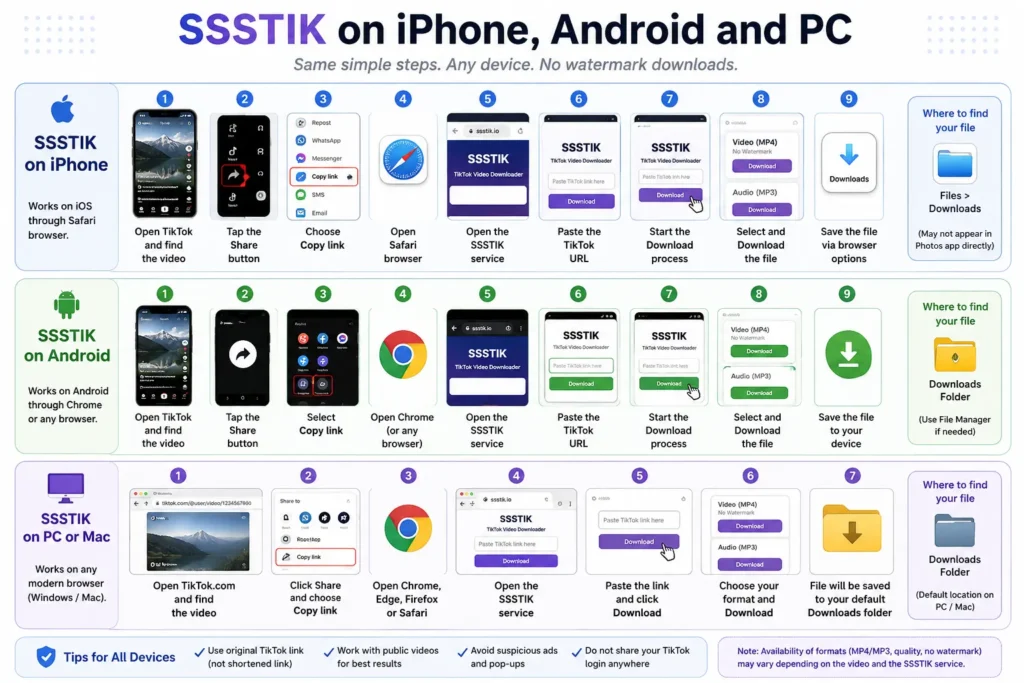
SSSTIK on iPhone
On an iPhone:
- Open TikTok.
- Find the video.
- Tap Share.
- Choose Copy link.
- Open Safari.
- Open the SSSTIK service.
- Paste the TikTok URL.
- Start the download.
- Save the resulting file through the browser’s download options.
Depending on the browser and iOS version, the file may appear in Files > Downloads rather than immediately appearing in the Photos app.
SSSTIK on Android
The Android process is usually:
- Open TikTok.
- Tap Share.
- Select Copy link.
- Open Chrome or another browser.
- Open SSSTIK.
- Paste the link.
- Start the download.
- Save the available file.
- Check the Downloads folder.
Some SSSTIK services specifically advertise Android support, but again, this does not mean every SSSTIK-branded domain provides exactly the same experience.
SSSTIK on PC or Mac
On a computer, you can copy the URL from TikTok’s website and paste it into the downloader. The basic process is:
TikTok → Share/Copy link → SSSTIK → Paste → Download
The downloaded file will normally be handled by your browser’s standard download location.
What Is SSSTIKTOK? Is It the Same as SSSTIK?
You may also see searches such as:
- SSSTIKTok
- SSSTIKTok downloader
- SSS TikTok
- Sstik
- SS TikTok
- SSSTIK MP4
- SSSTIKTok MP3
These terms are often used in the same general search ecosystem. However, do not assume that every website using a similar name belongs to one company or is technically the same service.
Current search results show several different domains using related branding, and their features and claims are not identical. So when you see “SSSTIKTok,” check the actual domain and its privacy/legal information instead of relying only on the name.
Is SSSTIK Free?
Many branded downloaders advertise free use and no registration. The main SSSTIK result currently describes its service as free and says users can download without limits.
However, “SSSTIK” is not one single universally controlled website, so the answer can depend on the specific service you are using. Also remember that a website being free does not necessarily mean that it is free from:
- advertisements
- redirects
- download prompts
- browser notifications
- other forms of monetization
That is one reason to be careful when choosing the download button.
Is SSSTIK Safe?
Short answer: be cautious.
Using a third party downloader is different from downloading a video directly through TikTok. The main risks are often not the video file itself but the website experience around it.
Watch for:
- misleading download buttons
- unexpected pop ups
- redirects
- requests to enable browser notifications
- requests to install unknown extensions
- suspicious APK files
- pages pretending to be TikTok
- files with unexpected extensions
A simple safety checklist
Before downloading:
- Check the website domain carefully.
- Do not enter your TikTok password.
- Do not install an APK just because a page tells you to.
- Do not install a browser extension unless you genuinely need it.
- Do not allow unnecessary browser notifications.
- Avoid files that have an unexpected extension.
- Keep your browser and device updated.
- If a page repeatedly redirects you, close it.
One important distinction
You will find SSSTIK sites making strong privacy claims such as “no data stored” or “privacy protected.” Those statements should be treated as claims by the individual service unless you can independently verify how that particular website handles your data.
SSSTIK Not Working? Try These Fixes
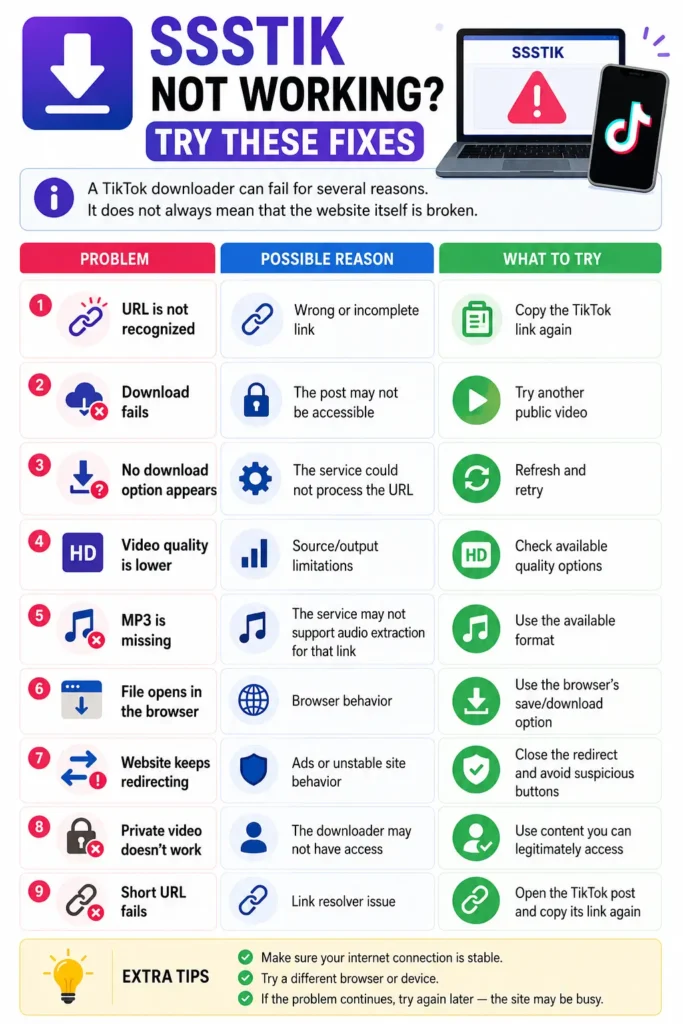
A TikTok downloader can fail for several reasons. It does not always mean that the website itself is broken.
| Problem | Possible reason | What to try |
|---|---|---|
| URL is not recognized | Wrong or incomplete link | Copy the TikTok link again |
| Download fails | The post may not be accessible | Try another public video |
| No download option appears | The service could not process the URL | Refresh and retry |
| Video quality is lower | Source/output limitations | Check available quality options |
| MP3 is missing | Service may not support audio extraction for that link | Use the available format |
| File opens in the browser | Browser behavior | Use the browser’s save/download option |
| Website keeps redirecting | Ads or unstable site behavior | Close the redirect and avoid suspicious buttons |
| Private video doesn’t work | The downloader may not have access | Use content you can legitimately access |
| Short URL fails | Link resolver issue | Open the TikTok post and copy its link again |
What if SSSTIK itself is down?
Try again later rather than repeatedly clicking suspicious buttons. You can also use a reputable alternative if you need to save a video you are authorized to download.
Can SSSTIK Download Private TikTok Videos?
You should not expect a third party downloader to bypass a private account or access controlled content.
TikTok itself limits downloading according to the creator’s settings. TikTok says users can save posts when the creator allows downloads, and creators can manage the video-download setting in their privacy controls. That is an important difference between:
saving publicly available content
and
trying to bypass access restrictions.
Do not give your TikTok login credentials to a downloader that claims it needs them to access private videos.
SSSTIK vs TikTok’s Built In Download Option
SSSTIK is not the only way to save TikTok videos. TikTok itself provides a download option when the creator allows it. According to TikTok’s official help documentation:
- Open the video.
- Tap Share.
- Tap Save video.
If “Save video” is not available, TikTok says the creator does not allow others to download that video through the built-in option. That gives users two very different approaches:
| Option | Main advantage | Limitation |
|---|---|---|
| TikTok’s built-in download | Official, simple method | Depends on creator download settings |
| Third-party downloader such as SSSTIK | May offer different download options | Adds third-party privacy/security considerations |
For a video that TikTok already allows you to save, the built-in option is the simplest place to start.
Is Downloading a TikTok Video Legal?
There is no universal yes or no answer.
The important distinction is between saving content and reusing someone else’s copyrighted work. For example, downloading a video for your own offline reference is different from:
- reposting it on your account
- using it in an advertisement
- selling it
- uploading it to another platform
- removing attribution and presenting it as your own
- using it in commercial content
TikTok’s current Terms say creators retain rights in their content and TikTok also says users must respect intellectual property rights. TikTok’s Intellectual Property Policy also explains that copyright generally protects original works such as videos and music, while noting that copyright exceptions vary by country.
Our practical advice
If you did not create the video, ask the creator for permission before reposting or using it commercially. And if you are downloading your own TikTok Trending videos, keep the original files whenever possible. TikTok itself recommends keeping offline copies of your own videos before posting.
Our Honest Take on SSSTIK
We think SSSTIK is useful when the job is simple: take a TikTok link and try to save an available video through a browser.
The appeal is obvious. There is usually no complicated editing workflow, and the basic process is easy enough for someone who has never used a downloader before. But we would not describe SSSTIK as a completely risk-free solution.
What we like
- Simple URL based workflow
- Easy for beginners
- Browser based options are convenient
- Some SSSTIK services offer MP4
- Some also offer MP3
- No need to learn video-editing software just to save a clip
What we don’t like
- The site name is used across multiple websites
- Features vary between domains
- Some services make very aggressive quality claims
- Third party download pages can contain ads or redirects
- Privacy claims are not always independently verifiable
- A successful download does not give you copyright ownership
Our verdict
SSSTIK can be useful for saving public TikTok content, but users should treat it as a third party tool rather than an official TikTok feature. If TikTok’s own Save video option is available and meets your needs, that is the simpler choice. If it is not available, a third-party service may provide another option, but you should check the domain, avoid suspicious prompts and respect the creator’s rights.
SSSTIK Alternatives
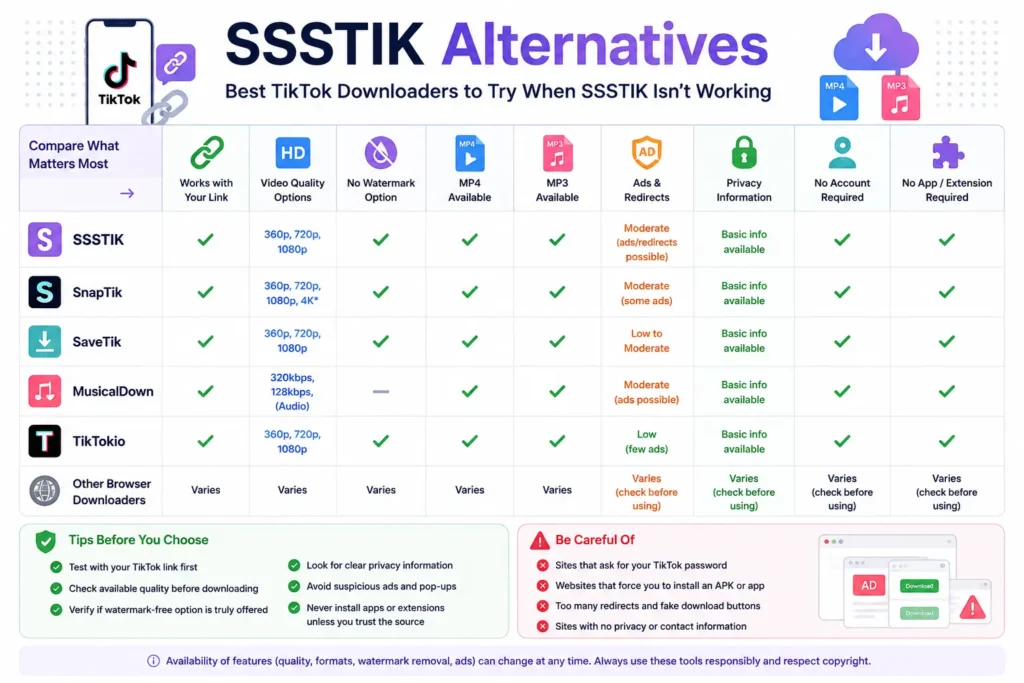
If SSSTIK is not working, you may come across other TikTok downloading services such as:
- SnapTik
- SaveTik
- MusicalDown
- TikTokio
- other browser based TikTok downloaders
The important thing is not to choose a tool simply because a page says it is “the best.”
Compare:
- whether it works with your link
- available video quality
- whether watermark-free output is offered
- MP4/MP3 availability
- ads and redirects
- privacy information
- whether an account is required
- whether an app or extension is being pushed
Current competitor pages show that the same market uses very similar claims around no-watermark downloads, HD output, MP4/MP3 and cross-device access.
Frequently Asked Questions About SSSTIK
Q1: Is SSSTIK free?
Many SSS branded services advertise free downloads. However, because several different websites use the site name, check the particular service you are using.
Q2: Can SSSTIK download TikTok videos without a watermark?
Some SSSTIK services advertise watermark free TikTok downloads. Whether that option appears can depend on the particular service and video.
Q3: Does SSSTIK work on iPhone?
Browser based SSSTIK services can be accessed from iPhone browsers. The exact download and file saving experience depends on the service and your browser.
Q4: Does SSSTIK work on Android?
Yes, many SSSTIK services are designed to work through mobile browsers, including Android.
Q5: Does SSSTIK support MP4?
Many SSSTIK services advertise MP4 downloads. MP4 is the appropriate choice when you want the complete video rather than audio only.
Q6: Does SSSTIK support MP3?
Some SSSTIK services offer MP3 extraction, but this is not necessarily available on every SSSTIK branded site or for every URL.
Q7: Why is SSSTIK not working?
Possible reasons include an unsupported URL, private or unavailable content, a temporary service problem, or an issue with the particular TikTok link. Try copying the link again and testing a different public video.
Q8: Can SSSTIK download private TikTok videos?
You should not expect a third-party downloader to bypass private content restrictions. Use only content that you are legitimately able to access.
Q9: Do I need an SSSTIK APK?
For a browser based SSSTIK service, an APK should not be necessary. Be especially careful with websites that unexpectedly ask you to install an APK or unknown application.
Q10: Can I repost a video downloaded with SSSTIK?
Downloading a video does not automatically give you permission to repost it. If someone else created the video, obtain permission when required and respect copyright and TikTok’s rules.
Final Thoughts
SSSTIK is best understood as a third party TikTok downloader rather than an official TikTok feature. Its main appeal is the simple link based process and, depending on the service, the ability to save videos in formats such as MP4 or extract audio as MP3.
The basic workflow is easy:
Copy TikTok link → Paste into SSSTIK → Process → Choose an available file → Save
But the easy part is not the whole story. Different SSSTIK Site branded websites can make different claims, and download results can vary. You should also consider security, privacy, video quality and copyright before using any third party downloader.
For content you own, keeping an original copy is always the better approach. For somebody else’s content, use downloaded material responsibly and get permission before reposting or using it commercially.