TikTok Voice Comments and Comment Polls: How the New Features Work
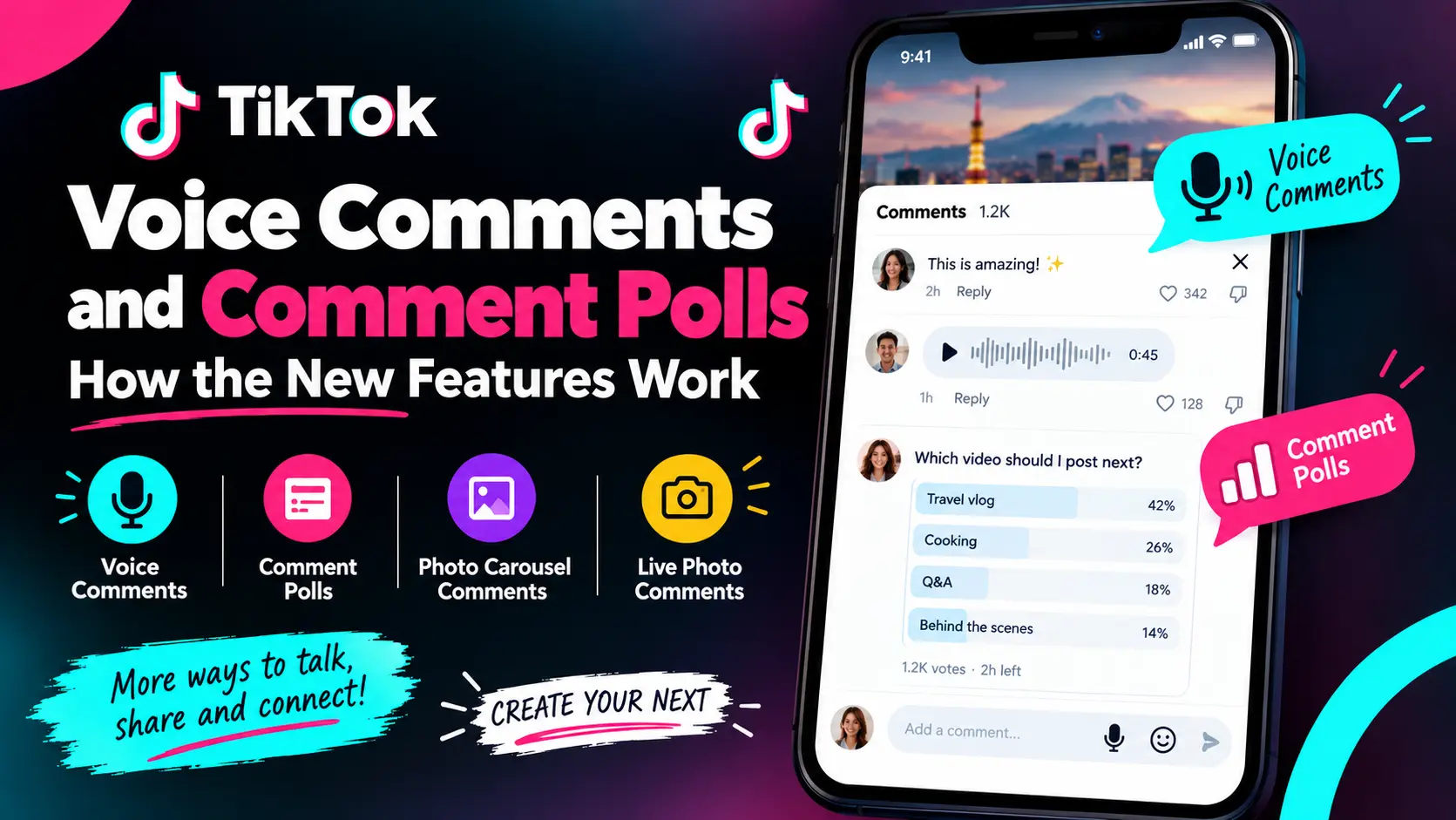
TikTok is giving its comment section a much bigger role. On September 3, 2026, TikTok announced new ways for people to interact under videos, including TikTok Voice Comments, Comment Polls, Photo Carousel Comments and Live Photo Comments. The update changes comments from simple text replies into a more interactive part of the app. Also read our Guide on TikTok Creator Summit Japan 2026.
TikTok says more than 1.7 billion comments are shared on the platform every day. That figure comes from TikTok itself, so it should be treated as a company-reported statistic rather than an independent measurement. The biggest changes for most users are Voice Comments and Comment Polls.
Voice Comments let people record and post an audio message under a video. Comment Polls let creators ask their audience a question and provide up to five choices for voting. TikTok says Voice Comments are rolling out globally over a month to accounts belonging to users aged 18 and older, while Comment Polls are already available globally. Here is what the new features mean, how they work, and what to do if you cannot see them yet.
TikTok’s New Comment Features at a Glance
TikTok announced four comment updates in September 2026.
| Feature | What it does | Current availability |
|---|---|---|
| Voice Comments | Lets users post and listen to audio comments | Rolling out globally |
| Comment Polls | Lets creators ask followers to vote | Available globally |
| Photo Carousel Comments | Lets users add up to 9 photos in one comment | Rolling out globally |
| Live Photo Comments | Lets users share Live Photos in comments | Available globally |
These availability details are based on TikTok’s September 3 announcement and can change as the rollout continues. The two features most likely to create new search questions are Voice Comments and Comment Polls, so those are the main focus of this guide.
What Are TikTok Voice Comments?
TikTok Voice Comments are audio messages that users can post directly in a video’s comment section. Instead of typing a reaction, you can record your voice. Other people can then tap the posted voice comment to listen to it.
TikTok says users can tap the microphone icon in the comment box and record a message of up to 60 seconds. Once posted, people can listen to the audio directly in the comment section. This gives users another way to react to videos.
For example, someone watching a funny video could record a laugh or spoken reaction. A viewer responding to a music video could sing along. Someone watching a story could give a longer spoken reaction instead of writing a paragraph.
TikTok Voice Comments at a glance
Detail | Current information |
|---|---|
| Feature | Voice Comments |
| Format | Audio |
| Maximum length | Up to 60 seconds |
| Where it appears | Video comment section |
| Age requirement announced by TikTok | 18+ |
| Availability | Global rollout over one month |
The age and rollout information above refers to TikTok’s initial announcement.
How to Use TikTok Voice Comments
If the feature has reached your account, the basic process is simple.
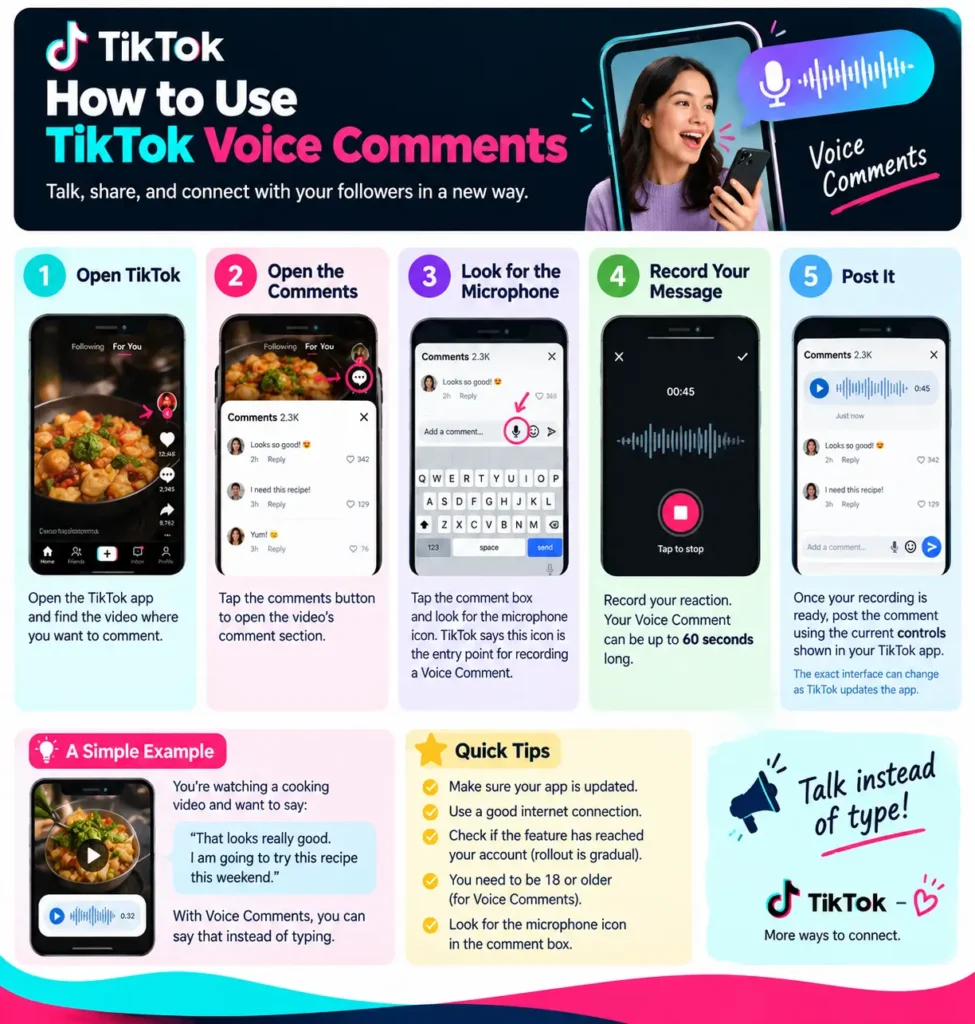
Step 1: Open TikTok
Open the TikTok app and find the video where you want to comment.
Step 2: Open the comments
Tap the comments button to open the video’s comment section.
Step 3: Look for the microphone
Tap the comment box and look for the microphone icon.
TikTok says the microphone is the entry point for recording a Voice Comment.
Step 4: Record your message
Record your reaction.
Your Voice Comment can be up to 60 seconds long.
Step 5: Post it
Once your recording is ready, post the comment using the current controls shown in your TikTok app. The exact interface can change as TikTok updates the app, so some users may see small differences.
A simple example
Imagine you are watching a cooking video and want to say:
“That looks really good. I am going to try this recipe this weekend.”
With Voice Comments, you can say that instead of typing it. The main idea is simple: talk instead of type.
Why Are TikTok Voice Comments Not Showing?
One of the most important questions is also one of the easiest to misunderstand. TikTok Voice Comments are not being made available to every eligible account at the same time.
TikTok said the feature would roll out globally over the following month to accounts belonging to users aged 18 and older. That means a person may see the microphone option while another person does not yet have it. So if TikTok Voice Comments are not showing, it does not automatically mean that your account has a problem.
Things to check
- Are you using an account that meets TikTok’s announced age requirement?
- Has the feature reached your account yet?
- Is your TikTok app updated?
- Does the microphone option appear in the comment box?
- Are you checking a normal video comment section?
- Has TikTok changed the location of the control in your current app version?
The rollout itself is the most important point. There is no need to assume that reinstalling the app will unlock the feature. Unless TikTok gives a specific troubleshooting instruction, the safest explanation is that availability can differ during a gradual rollout.
What Are TikTok Comment Polls?
TikTok Comment Polls let creators put a poll directly into the comments of their own videos. Instead of asking followers to answer with random comments, the creator can give viewers a set of choices.
TikTok says creators can add a poll while commenting on their own video, choose up to five options, and set how long the voting will remain open. Results can then be tracked as votes come in. TikTok says Comment Polls are available globally.
This makes the feature especially useful for simple audience questions. For example:
Which video should I make next?
- Cooking tutorial
- Travel vlog
- Q&A
- Behind the scenes
- Product review
Followers can choose an answer instead of writing a separate comment.
How to Create a TikTok Comment Poll
Comment Polls are designed for creators and are used on their own videos. The basic process is:
- Open one of your own TikTok videos.
- Open the comment section.
- Open the comment composer.
- Select the poll option.
- Add your question or prompt.
- Add your answer choices.
- Choose how long voting should remain open.
- Publish the poll.
- Watch the results as people vote.
TikTok says creators can add up to five options and track the results directly in the comment section. The exact button placement can change with app updates, so use the labels currently shown on your account.
How Creators Can Use TikTok Comment Polls
A poll is most useful when the question has a clear answer. Here are some practical examples.
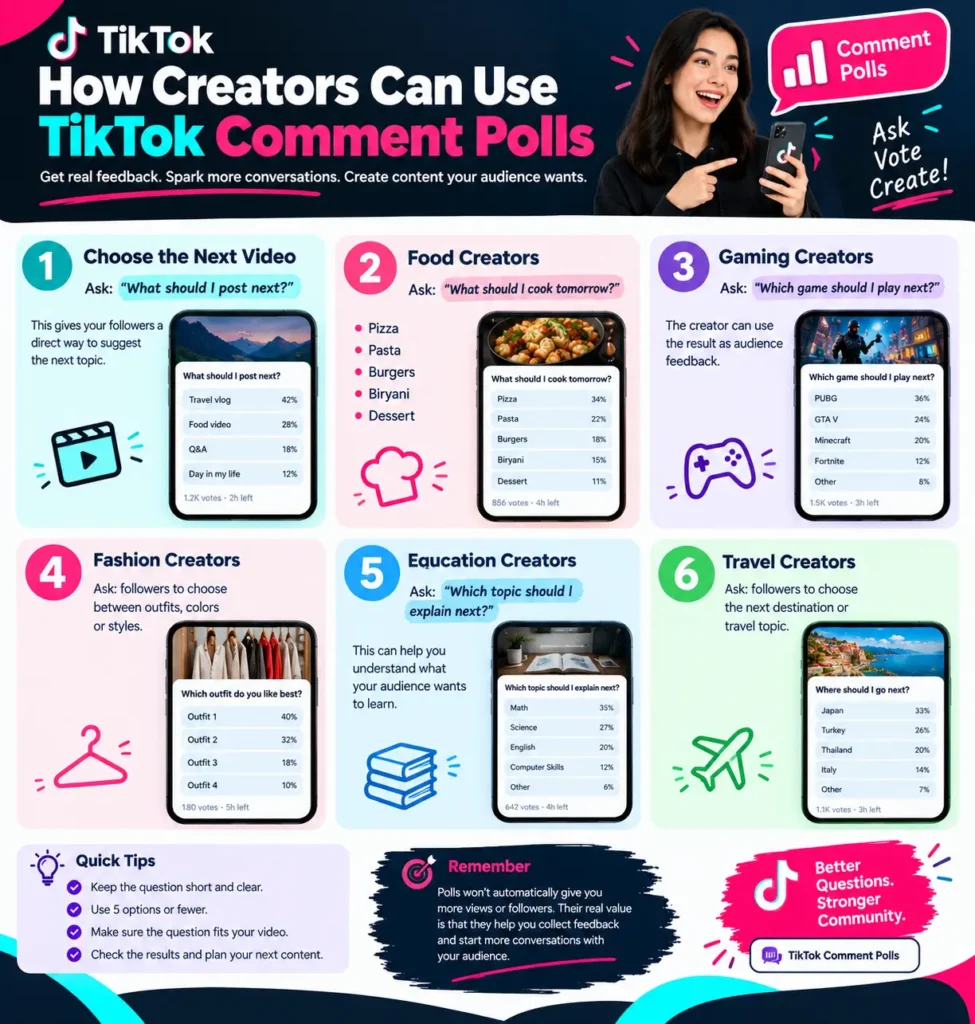
1. Choose the next video
Ask:
What should I post next?
This gives followers a direct way to suggest the next topic.
2. Food creators
Ask:
What should I cook tomorrow?
- Pizza
- Pasta
- Burgers
- Biryani
- Dessert
3. Gaming creators
Ask:
Which game should I play next?
The creator can use the result as audience feedback.
4. Fashion creators
Ask followers to choose between outfits, colors or styles.
5. Education creators
Ask:
Which topic should I explain next?
This can help a creator understand what their audience wants to learn.
6. Travel creators
Ask followers to choose the next destination or travel topic.
These examples do not mean polls will automatically increase views or followers. Their main value is that they provide a simple way to ask an audience for feedback.
TikTok Voice Comments vs Comment Polls
The two features serve different purposes.
| Feature | TikTok Voice Comments | TikTok Comment Polls |
|---|---|---|
| Main purpose | Spoken reactions | Audience voting |
| Main user | Viewers | Creators |
| Format | Audio | Multiple-choice poll |
| Maximum | Up to 60 seconds | Up to 5 choices |
| Best for | Personal reactions | Quick decisions |
| Availability | Global rollout | Globally available |
| Example | Spoken reaction to a video | Choosing the next video idea |
TikTok’s official announcement confirms the 60-second Voice Comment limit and five-option Comment Poll limit. So the choice is simple:
Want to say something?
Voice Comments are designed for that.
Want your audience to choose something?
Comment Polls are designed for that.
What Other TikTok Comment Features Did TikTok Add?
Voice Comments and Comment Polls are not the whole update. TikTok also announced two photo-related changes.
Photo Carousel Comments
Users can add up to nine photos in one comment. That means a person can share a small collection instead of choosing just one image.
For example, someone responding to a travel video could share several photos from their own trip in one comment. TikTok says Photo Carousel Comments are rolling out globally over the month.
Live Photo Comments
TikTok also introduced Live Photo Comments, allowing users to share Live Photos from their camera roll. TikTok says Live Photo Comments are available globally. Together, the four updates give TikTok users more ways to communicate:
Voice → Polls → Multiple Photos → Live Photos
The common idea is to make the comment section more interactive.
TikTok Comment Features in Numbers
Here are the main numbers to remember:
1.7 billion+
TikTok says more than 1.7 billion comments are shared across the platform every day. This is a TikTok-reported figure.
60 seconds
A TikTok Voice Comment can be up to 60 seconds long, according to TikTok’s announcement.
5 options
Creators can add up to five options to a Comment Poll.
9 photos
A Photo Carousel Comment can include up to nine photos.
These numbers show how much the comment format is expanding beyond simple text.
TikTok Comments, Moderation and Safety
More ways to comment also mean creators need more ways to manage their comment sections. TikTok already provides tools for controlling and moderating comments.
Creators can choose who is allowed to comment on their posts. Depending on account settings, options include everyone, followers or friends. TikTok also provides comment filters for spam, keywords and inappropriate or offensive comments.
Creators can also delete comments. TikTok says users can delete individual comments and can select up to 100 comments for bulk deletion. Comments can also be reported when users believe they violate TikTok’s Community Guidelines.
Voice Comments make this area especially important because audio introduces another form of user-generated content into the comment section. TikTok told TechCrunch that Voice Comments are subject to the same Community Guidelines as other content and that its moderation systems include automated and human detection tools, with speech-to-text transcription among the technologies used to identify policy-violating content.
That does not mean every unwanted voice comment will disappear automatically. Creators should still use TikTok’s available comment controls.
How Comment Insights Fits Into TikTok’s Comment Strategy
TikTok already has another tool called Comment Insights. According to TikTok Support, Comment Insights uses AI to summarize and filter comments into different categories. It can help creators see frequently discussed topics, find content ideas from audience suggestions, identify positive comments or questions, and decide which comments or viewers to engage with.
This creates an interesting connection between TikTok’s comment tools. A creator could use:
Comment Polls → collect direct choices
Comments → read audience reactions
Comment Insights → identify common topics
New content → respond to audience feedback
There is an important limitation, though. TikTok does not state in the Voice Comments announcement that Voice Comments automatically become part of Comment Insights. So it would be wrong to claim that every voice recording will be analyzed by the feature.
Comment Insights itself is also not available everywhere, according to TikTok Support.
What We Think About TikTok Voice Comments and Comment Polls
Our view is that the two features solve different problems.
Comment Polls may be the more practical tool for creators who regularly ask their audience to choose between ideas. A simple five-option question can be easier to answer than asking hundreds of people to write their own responses.
Voice Comments are more about expression. A spoken response can feel different from a short text reply, especially when tone or emotion matters. At the same time, audio can take longer to listen to than text takes to read, and it adds another type of content that creators may need to manage.
The gradual rollout is also worth watching. Since Voice Comments are being introduced over a month rather than appearing for every eligible account at once, some users will naturally see the feature before others.
So we would not treat the missing microphone icon as proof that something is wrong with an account. The bigger change is that TikTok is giving its comment section more formats instead of treating it as a simple text box.
What Creators Should Try First
If Comment Polls are available on your account, start with simple questions. Good polls have:
- one clear question
- short answer choices
- options that are easy to understand
- a real connection to the video
- a useful reason for asking
For google Voice Comments, creators can encourage spoken reactions when a voice response makes more sense than typing.
Some practical ideas include:
- Ask followers to explain their opinion.
- Invite reactions to a story or funny clip.
- Ask for spoken feedback about a topic.
- Use Comment Polls to choose future content.
- Review the responses before planning the next post.
- Keep comment moderation active.
Don’t promise that using these features will make a video viral. There is no basis for saying that simply using a Voice Comment or Comment Poll guarantees better reach.
TikTok Voice Comments and Comment Polls FAQ
What are TikTok Voice Comments?
TikTok Voice Comments let users record and post audio messages directly under TikTok videos. Other users can tap the posted comment to listen.
How long can a TikTok Voice Comment be?
TikTok says Voice Comments can be up to 60 seconds long.
How do I leave a Voice Comment on TikTok?
Open a video’s comments, tap the comment box and look for the microphone icon. If Voice Comments are available on your account, you can use it to record and post an audio message.
Why don’t I have TikTok Voice Comments?
TikTok says Voice Comments are rolling out globally over a month to accounts belonging to users aged 18 and older. Your account may therefore receive the feature later than another account.
Are TikTok Voice Comments available globally?
TikTok announced a global rollout, but the feature is being introduced gradually over a month. That means availability can differ during the rollout period.
What are TikTok Comment Polls?
Comment Polls allow creators to ask a question in the comment section of their own video and let viewers vote among several choices.
How many options can a TikTok Comment Poll have?
TikTok says creators can add up to five options to a Comment Poll.
Are TikTok Comment Polls available globally?
TikTok says Comment Polls are now available globally.
Can creators see the results of Comment Polls?
Yes. TikTok says creators can track results as votes come in directly in the comment section.
What other comment features did TikTok introduce?
TikTok also announced Photo Carousel Comments and Live Photo Comments. Photo Carousel Comments can contain up to nine photos, while Live Photo Comments let users share Live Photos from their camera roll.
Can TikTok creators control comments?
Yes. TikTok provides tools for choosing who can comment, filtering comments, reviewing filtered comments, deleting comments and reporting comments.
What is TikTok Comment Insights?
Comment Insights uses AI to summarize and filter comments into categories. TikTok says it can help creators understand common topics, find content ideas, see positive comments or questions, and decide which comments to engage with.
Final Thoughts
TikTok’s September 2026 comment update is more than one new button. Voice Comments give users a way to speak instead of type. Comment Polls give creators a direct way to ask their audience to choose between options. TikTok has also expanded photo comments with carousels and Live Photos.
For users, the biggest thing to remember is that Voice Comments are being rolled out gradually, so the microphone may not appear immediately.
For creators, Comment Polls are already globally available according to TikTok and can be used for simple audience questions and content decisions.
The comment section is becoming a bigger part of the TikTok experience. With voice, polls, photos and other interactive formats, there are now more ways to continue a conversation after a video ends.
Sources We Have Taken Help From
- TikTok Newsroom: September 3, 2026 announcement on Voice Comments, Comment Polls and photo comment updates.
- TikTok Support: Comment management, filtering, deletion and reporting.
- TikTok Support: Comment Insights.
- TechCrunch: reporting on Voice Comments, rollout and moderation.