How to Use TikTok in 2026 – Free Complete Beginner’s Guide
Nowadays, everyone in the world has a phone, and almost everybody has the TikTok app on it. But opening the app for the first time can feel confusing fast. What is the FYP? How to post video on TikTok? This guide “how to use tiktok in 2026” from TTStoryViewer.io walks through every part of using TikTok, step by step, in plain and simple words.
What Is TikTok, and Why It Matters in 2026?
TikTok is an online app that is used for making and watching short videos. People use it to laugh, learn, shop, and connect, all in one place.
TikTok was actually started in China in 2016 under the name Douyin. A global version which was launched in 2017, and the app quickly became one of the most downloaded apps ever built. Today, over a billion people open TikTok every single month.
Who Actually Uses TikTok Today
The audience has grown far beyond teenagers dancing in bedrooms. Small businesses, news outlets, comedians, teachers, and even government agencies now post regularly, since the platform’s reach works for far more than entertainment alone.
How to Setup TikTok Account
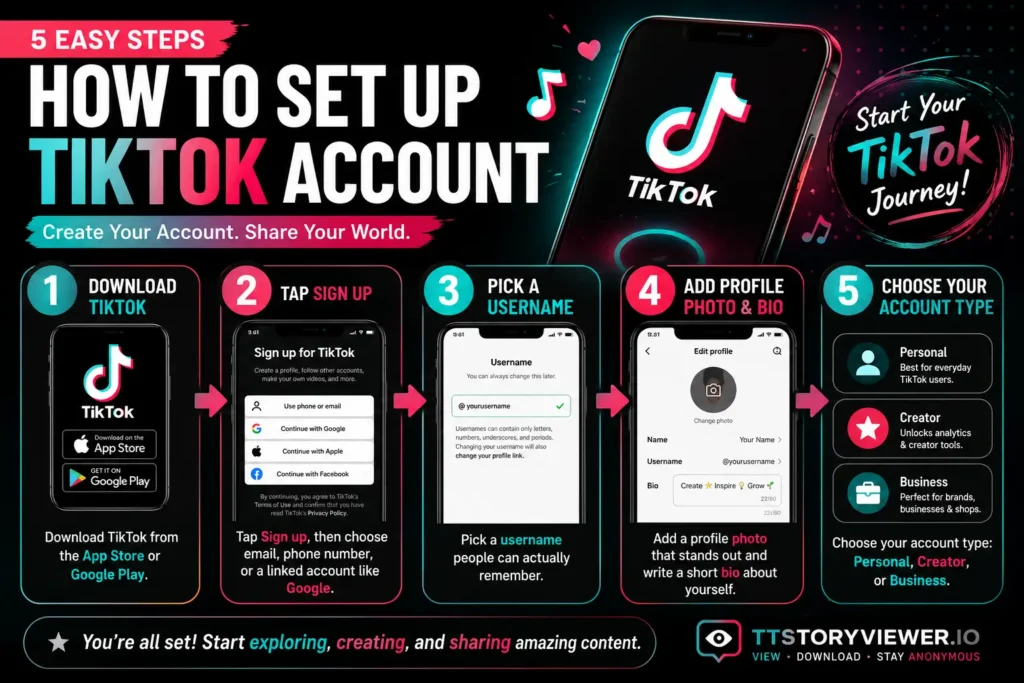
Getting started takes just a few minutes:
- Download TikTok from the App Store or Google Play.
- Tap Sign up, then choose email, phone number, or a linked account like Google.
- Pick a username people can actually remember.
- Add a profile photo and a short bio.
- Choose your account type: Personal, Creator, or Business.
If you are using a Personal account the, works fine for most beginners. A Creator or Business account unlocks extra tools like analytics and a Commercial Music Library, useful once posting becomes a regular habit. Use these simple steps to get answers to your question “how to setup TikTok account”.
Privacy Settings to Check Before Your First Post
Before posting anything, open Settings and privacy, then Privacy, and check if your account is public or private. New accounts default to public, meaning anyone can view your videos unless changed.
Understanding the TikTok Interface
Opening TikTok for the first time drops you straight onto the For You Page, known as the FYP. This feed shows videos picked just for you, based on what you watch, like, and share.
The Following feed sits right next to it, showing content only from accounts you already follow. Most beginners spend nearly all their time on the FYP, since it is built for discovery.
A Discover tab rounds out the interface, surfacing trending sounds, hashtags, and topics before they peak. Checking this tab regularly helps a new creator catch a trending format early, while it still carries strong discovery potential.
| Feed | What It Shows |
|---|---|
| For You Page (FYP) | Videos picked by the algorithm based on your activity |
| Following | Videos only from accounts you follow |
| Discover | Trending sounds, hashtags, and topics |
How to Post Your First TikTok Video
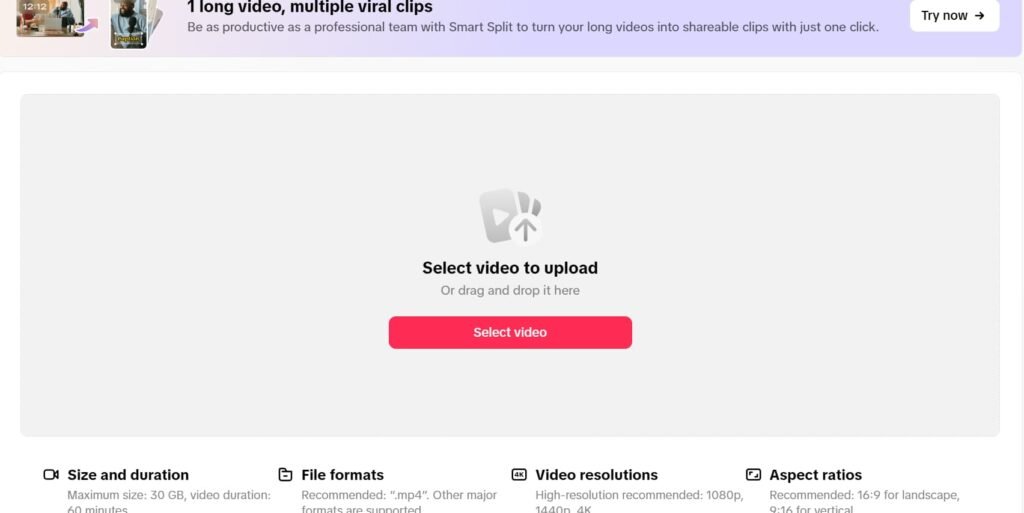
Posting takes a few taps once you know the flow:
- Tap the + button at the bottom of the screen.
- Record a new clip or upload one already saved on your phone.
- Tap Add sound to pick music or trending audio.
- Add text, captions, or turn on auto captions.
- Apply an effect, filter, or transition if it fits the video.
- Write a caption, add hashtags, and tap Post.
A video without text on screen is rare on TikTok these days, since captions help viewers watching without sound follow along.
How TikTok’s Algorithm Actually Works
TikTok’s algorithm decides who sees your video next. It leans on a few main signals: watch time, rewatches, comments, shares, and saves. Follower count plays a smaller role than most beginners assume, which is exactly why small accounts still land viral videos regularly.
The first hour after posting matters most. TikTok for beginners shows a new video to a small test group first, and strong engagement in that window earns a bigger push to more people. A quiet first hour rarely recovers later, no matter how good the video actually is.
Core Features Every Beginner Should Learn for How to Use TikTok
| Feature | What It Does |
|---|---|
| Duet | Creates a split video next to someone else’s clip |
| Stitch | Clips a piece of another video into your own |
| LIVE | Streams video in real time to your followers |
| Hashtags | Groups your video with similar content for discovery |
Duet and Stitch both need the original video’s privacy settings to allow them, so a locked video cannot be duetted or stitched by others.
Hashtags deserve special attention, since mixing broad tags like #fyp with a few specific, niche tags tends to perform better than stuffing a caption with ten generic ones. Going LIVE unlocks real time comments and gifts, though it usually requires a minimum follower count before it becomes available.
How to Grow Audience on TikTok
Growth rarely comes from one lucky viral video.TikTok for beginners is now easy to understand because of multiple guides on the internet. It comes from a repeatable pattern:
- Pick two or three content pillars, topics you can keep making videos about
- Post consistently, even a few times a week beats one video a month
- Reply to comments, since engagement often boosts a video further
- Study what performs well and make more of it
- Watch the first three seconds closely, since a weak hook loses viewers before the algorithm even gets a fair signal
A jewelry business we referenced in an earlier guide received 40 orders on its first viral video’s opening day, then 700 orders within a week, proof that consistency paired with a lucky format can move fast once it clicks. Businesses considering this path further can check our full guide on the business side of TikTok for monetization details beyond organic growth.
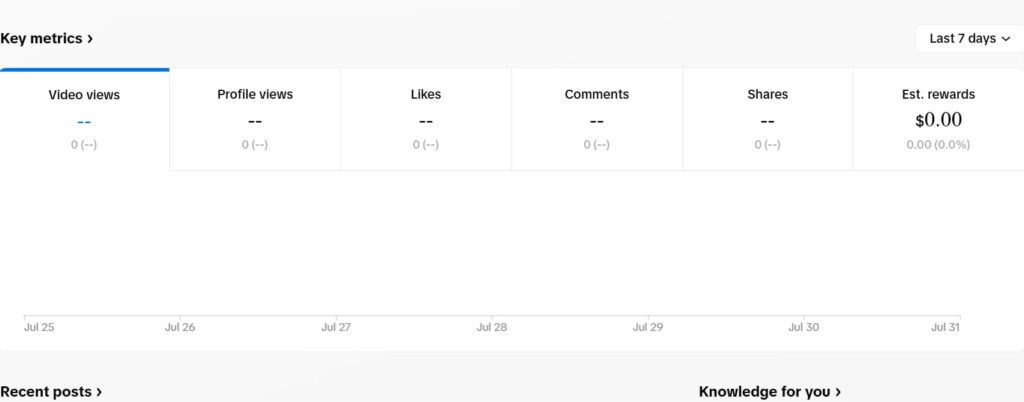
How to Read TikTok Analytics
Analytics live inside TikTok Studio, reachable from your profile. Creator and Business accounts get the deepest view, showing watch time, audience activity, and traffic sources per video.
For beginners, three numbers matter most: average watch time, completion rate, and where viewers came from, FYP or Following. These three numbers explain far more about performance than the view count alone.
TikTok Help Center
Stuck on something the app itself won’t explain? TikTok’s own Help Center covers far more than most people realize.
Reach it through Profile, then the menu icon, then Settings and privacy, then Help Center, or visit support.tiktok.com directly. It covers account access issues, privacy and safety, monetization and payments, and general app usage.
If a listed answer doesn’t fix the issue, tapping Report a problem opens a direct path to TikTok’s support team, usually with a reply within a few days. Common categories include account and profile access, privacy and safety, monetization and payments, and general app usage questions, covering nearly everything a beginner runs into.
TikTok Tutorial: Best Ways to Keep Learning
A single guide only covers so much. A few genuinely useful ways to keep learning after this article:
- Watch TikTok tutorial videos directly inside TikTok using the search bar, since many creators post format specific walkthroughs.
- Check TikTok’s own in app tips, often surfaced right after posting a video.
- Follow a few creators in your niche and study their posting pattern over a month.
- Save videos that use a technique you want to try later, so you can rewatch the exact timing and structure.
- Revisit this guide as TikTok rolls out new features throughout 2026.
TikTok Usage by the Numbers
| Stat | Figure |
|---|---|
| Global monthly active users | Over 1 billion |
| Original launch name and year | Douyin, 2016 (China) |
| Global launch year | 2017 |
| Average daily time spent per user | 52 minutes |
| Window that shapes most of a video’s reach | First 60 minutes after posting |
Our Honest Review on TikTok: Is it Actually Easy to Learn?
Testing the app from a true beginner’s perspective shows a real learning curve in the first week, mostly around understanding why some videos get pushed and others don’t. Past that first week, the interface itself becomes second nature fast.
New users consistently report the same pattern: the first few videos barely get seen, then something shifts once the algorithm learns the account’s niche. This lines up with how the algorithm actually works, since it needs a handful of data points before it can match content to the right audience confidently.
Our honest take: TikTok rewards consistency far more than perfection. A rough video posted regularly tends to outperform one polished video posted once and forgotten.
Common Mistakes New Users Make
- Posting once, then waiting days before posting again
- Ignoring captions, losing viewers who watch without sound
- Skipping trending sounds entirely, missing an easy discovery boost
- Never checking TikTok Studio Analytics to see what’s actually working
- Deleting a low performing video too quickly instead of learning from it
- Copying a trend exactly instead of adapting it to a specific niche
How TTStoryViewer Fits Into Learning TikTok
TTStoryViewer lets you view and save public TikTok content without logging in to an account. Studying how other creators structure a video, before posting your own, gets a lot easier with a quick, login free look. Check our guide on 2026’s biggest TikTok trends for real examples worth studying. You can also downlaod and view TikTok stories and videos on iPhone with the tool made, which is free and can be used without login.
Frequently Asked Questions
Q1: How do I start using TikTok as a beginner?
Download the app, create an account, choose a username and bio, then start by watching the For You Page before posting your first video.
Q2: What is the difference between the FYP and Following feed?
The FYP shows videos picked by the algorithm based on your activity, while Following shows content only from accounts you already follow.
Q3: How do I contact TikTok Help Center?
Go to Settings and privacy, then Help Center, or visit support.tiktok.com directly for account, privacy, and payment support.
Q4: How long does it take to grow on TikTok?
Growth varies widely, but consistent posting over several weeks typically shows clearer results than a single video.
Q5: Is TikTok free to use?
Yes, downloading the app, creating an account, and posting videos costs nothing. Optional purchases exist for LIVE gifts and TikTok Shop.
Q6: What should my first TikTok video be about?
Pick a topic you already know well. The first few videos help the algorithm learn your niche, so starting with familiar content works better than chasing an unrelated trend immediately.
Q7: Can I use TikTok without posting any videos?
Yes, many people use TikTok purely to watch content on the FYP without ever posting, and this is completely normal.
Final Word
Using TikTok well comes down to a few basics: a clear profile, consistent posting, and paying attention to what the analytics actually show. For more TikTok guides, visit the TTStoryViewer.io, or check our breakdown of TikTok app permissions to keep your account secure while you grow. We hope that now all your questions related to “how to use TikTok?” are answered.